Bio
- 👩🏽💻 Software engineer at Bloomberg in NYC
- ✨ Core developer of numpydoc and creator of numpydoc's pre-commit hook, which uses ASTs
- ✍ Author of "Hands-On Data Analysis with Pandas"
- 🎓 Bachelor's degree in operations research from Columbia University
- 🎓 Master's degree in computer science from Georgia Tech
Prerequisites
- Comfort writing Python code, especially object-oriented programming
- Have Python and Git installed on your computer, as well as a text editor for writing code (e.g., Visual Studio Code)
- Fork and clone this repository: github.com/stefmolin/ast-workshop
- Install the repository's dependencies by running
uv syncorpip install . - Open up these slides in your browser and use the arrow keys to follow along: stefaniemolin.com/ast-workshop
- Open up the documentation for the
astmodule in your browser to consult during the exercises: docs.python.org/3/library/ast.html
Abstract Syntax Tree (AST)
- Represents the structure of the source code as a tree
- Nodes in the tree are language constructs (e.g., module, class, function)
- Each node has a single parent (e.g., a class is a child of a single module)
- Parent nodes can have multiple children (e.g., a class can have several methods)
Let's see what this code snippet (greet.py) looks like when represented as an AST:
class Greeter:
    def __init__(self, enthusiasm: int = 1) -> None:
        self.enthusiasm = enthusiasm

    def greet(self, name: str = 'World') -> str:
        return f'Hello, {name}{"!" * self.enthusiasm}'
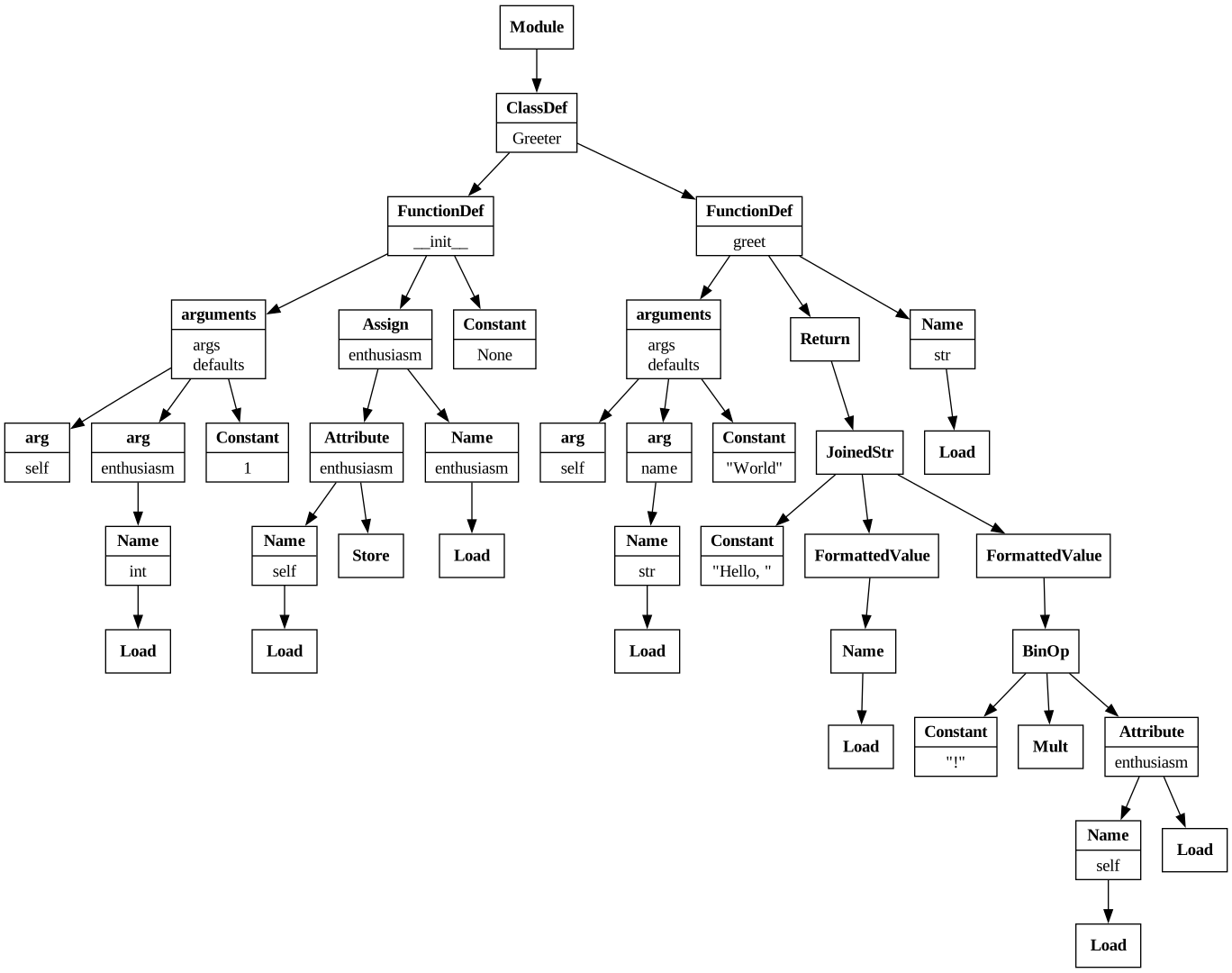
The AST for the
greet.py snippet visualized with Graphviz.
Popular open source tools that use ASTs
We can generate ASTs without installing the codebase being analyzed or its dependencies, which makes it a popular choice to building tools:
-
Linters and formatters, like
ruff(Rust) andblack(Python) -
Documentation tools, like
sphinxand thenumpydoc-validationpre-commit hook -
Automatic Python syntax upgrade tools, like
pyupgrade -
Next-generation notebooks, like
marimo -
Type checkers, like
mypy -
Code security tools, like
bandit -
Code and testing coverage tools, like
vultureandcoverage.py -
Testing frameworks that instrument your code or generate tests based on it, like
hypothesisandpytest
ASTs in Python
- Represent syntactically-correct Python code (cannot be generated in the presence of syntax errors)
- Created by the parser as an intermediary step when compiling source code into byte code (necessary to run it)
-
Available in the standard library via the
astmodule
Parsing Python source code into an AST
1. Read in the source code
>>> from pathlib import Path
>>> source_code = Path('snippets/greet.py').read_text()
2. Parse it with the ast module
If the code is syntactically-correct, we get an AST back:
>>> import ast
>>> tree = ast.parse(source_code)
>>> print(type(tree))
<class 'ast.Module'>
Inspecting the AST
We can use the ast.dump() function to display the AST:
The root node is an ast.Module node:
It contains everything else in its body attribute:
The greet.py file first defines a class, named Greeter:
The ast.ClassDef node also contains the body of the Greeter class:
The first entry is the Greeter.__init__() method:
The ast.FunctionDef node includes information about the arguments:
Its body contains the AST representation of the function's code:
The return annotation is stored in the returns attribute:
The final entry is the Greeter.greet() method:
An alternative view with ast-explore
We can use the ast-explore tool to navigate the AST on the command line and extract available information from each of the node types. This was installed from PyPI when we installed the dependencies for this workshop, and we will use it throughout. Try it out with the following command:
$ ast-explore snippets/greet.py | less
uv user, prefix the command with uv run (or install ast-explore as a tool: uv tool install ast-explore).
Windows users may need to use more instead of less.
**************************************************************
**   1. Module (docs.python.org/.../ast.html#ast.Module)    **
**************************************************************

🌲 Path to this node from the root node of the AST:
   Module

📍 This node type does not have any line number information.

📝 Docstring is missing.

✨ AST node-specific fields and their values:
   - body         : [ClassDef(name...ype_params=[])]
   - type_ignores : []

**************************************************************
** 2. ClassDef (docs.python.org/.../ast.html#ast.ClassDef)  **
**************************************************************

🌲 Path to this node from the root node of the AST:
   Module -> ClassDef

🐍 Source code represented by the node:
   1 | class Greeter:
   2 |     def __init__(self, enthusiasm: int = 1) -> None:
   3 |         self.enthusiasm = enthusiasm
   4 |
   5 |     def greet(self, name: str = 'World') -> str:
   6 |         return f'Hello, {name}{"!" * self.enthusiasm}'

📍 Location in the source code:
   - lineno         : 1
   - end_lineno     : 6
   - col_offset     : 0
   - end_col_offset : 54

📝 Docstring is missing.

✨ AST node-specific fields and their values:
   - name           : 'Greeter'
   - bases          : []
   - keywords       : []
   - body           : [FunctionDef(...), FunctionDef(...)]
   - decorator_list : []
   - type_params    : []

... (output truncated)
Exercise 1
- Try passing source code that has a
SyntaxErrorinto theast.parse()function. What happens? - What about if the code has an error unrelated to syntax, for instance, a
NameErrororTypeError?
Example solution
1. Syntactically-incorrect source code
Let's use the following malformed import statement as an example of invalid source code:
>>> import timedelta from datetime
  File "<stdin>", line 1
    import timedelta from datetime
    ^^^^^^^^^^^^^^^^^^^^^^^^^^^^^^
SyntaxError: Did you mean to use 'from ... import ...' instead?
We also encounter a SyntaxError when attempting to parse this into an AST:
2. Syntactically-correct source code with logic errors
The following code raises a NameError at runtime:
>>> a + 5
Traceback (most recent call last):
  File "<stdin>", line 1, in <module>
    a + 5
    ^
NameError: name 'a' is not defined
However, it is syntactically-correct, so we can parse it into an AST:
>>> ast.parse('a + 5')
Module(body=[Expr(value=BinOp(...))], type_ignores=[])
AST node attributes
In addition to being a highly-nested structure, attributes containing nodes may be named differently across node types. To see this, let's take a look at the AST for the following snippet in assert.py:
def duplicate_list(x):
    assert isinstance(x, list)
    return x + x
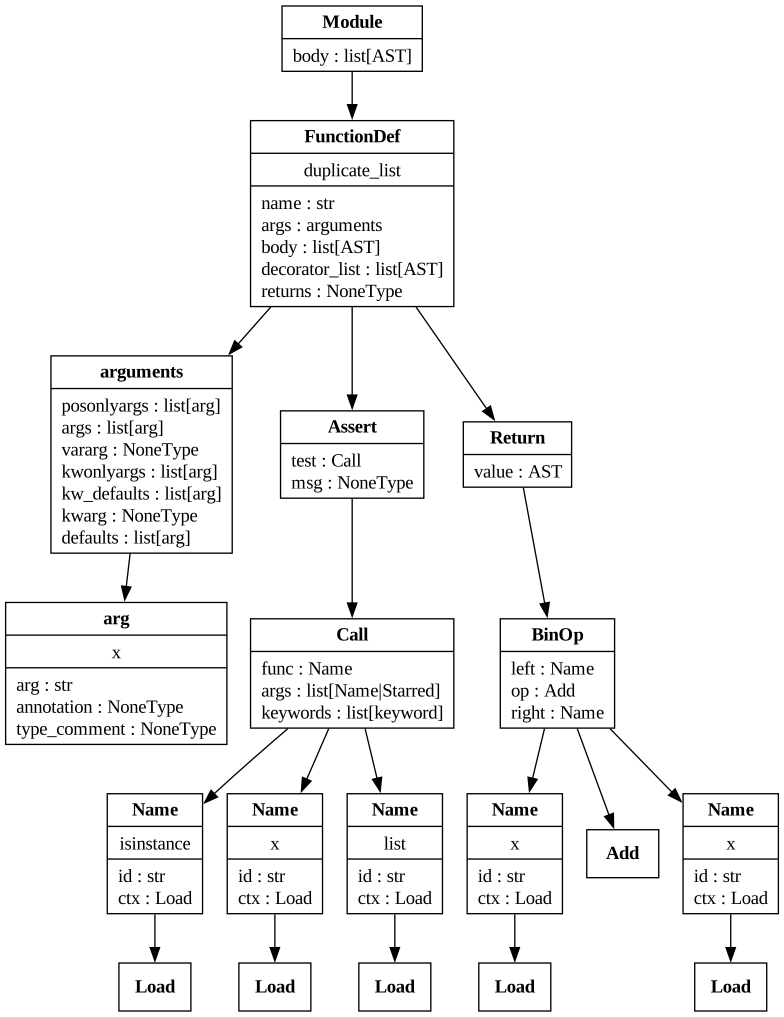
The AST for the
assert.py snippet with node attributes visualized with Graphviz.
An alternative view with ast-explore
We can use ast-explore to look at only the subset of nodes we are interested in with --types (or exclude types we know we aren't interested in with --skip). There is also an interactive mode, which allows you to step through one node at a time. Try it out by running the following command:
$ ast-explore snippets/assert.py \
    --interactive \
    --types FunctionDef arguments arg
Traversing the AST
To effectively analyze code using the AST, we need to traverse it and inspect the nodes we care about. Depending on how much of the tree we want to explore and how much context we need about each node, there are different approaches. Let's walk through the different ways using the assert.py example:
import ast
from pathlib import Path

source_code = Path('snippets/assert.py').read_text()
tree = ast.parse(source_code)
ast.iter_fields()
We can use the ast.iter_fields() function to iterate over all fields that a node has. Our AST is rooted at an ast.Module node, so there isn't much here:
>>> print(list(ast.iter_fields(tree)))
[('body', [<ast.FunctionDef at 0x1086bea10>]),
 ('type_ignores', [])]
However, if we look at this for the ast.FunctionDef node in the body of the ast.Module node, we have more information:
ast.iter_child_nodes()
The ast.iter_fields() function is helpful when figuring out how to work with individual node types. The ast.iter_child_nodes() builds on top of this to traverse the tree starting at a given node. It yields all nodes it encounters along the way that are direct children of the starting node (they can be in any field, but they cannot be grandchildren, like the children of the ast.Assert node below would be to the ast.FunctionDef node):
>>> print(list(ast.iter_child_nodes(func_def)))
[<ast.arguments at 0x1085794e0>,
 <ast.Assert at 0x10884d6c0>,
 <ast.Return at 0x10884d9f0>]
To traverse the entire tree, we need the recursive behavior provided in the ast.walk() function or the ast.NodeVisitor/ast.NodeTransformer classes.
Each of these builds upon the functions we just looked at (ast.iter_fields() and ast.iter_child_nodes()).
Let's start with the ast.walk() function.
ast.walk()
The ast.walk() function recursively yields all descendant nodes in the AST. Let's use it to make sure all assert calls provide a message when the assert is false and an AssertionError is raised.
For those unfamiliar with the syntax, here's a comparison using the contents of the assert.py snippet:
# without custom message
def duplicate_list(x):
    assert isinstance(x, list)
    return x + x

# with custom message
def duplicate_list(x):
    assert isinstance(x, list), 'Input is not a list'
    return x + x
Modifying code before running it with ast.walk()
The ast.walk() function yields all nodes descending from tree:
We want to modify all ast.Assert nodes that do not have a message (msg):
We set the msg to a placeholder value, so it's easy to find in the logs:
All nodes must have line numbers in order to compile the AST into a code object:
The compile() function turns our modified AST into a code object:
We can execute code objects with the exec() function:
This runs the function definition for duplicate_list(), so we can now call it:
The input we passed fails the assert, raising an AssertionError:
Notice that we get the message we injected when we modified the AST:
Can we convert this back into source code to save it?
With a small example like this, we can also use the ast.unparse() function to convert the modified AST back into Python source code:
The ast.unparse() function comes with some caveats:
- It's not recommended for larger trees since it can hit recursion limits.
- If we first convert source code to an AST, and then attempt to convert it back without any changes, the result will be equivalent, but not necessarily equal to the original.
Introduced in Python 3.14, the ast.compare() function compares ASTs recursively. Here, we can see an example of structurally-equivalent, but stylistically-different programs:
If we scale this example up to a slightly larger program with comments and more stylistic formatting, there will be even more differences:
import contextlib


def strip_password(
    credentials: dict[str, str]
) -> None:
    '''
    Strip out the password from the credentials.
    '''

    # remove the password if it is there
    with contextlib.suppress(KeyError):
        del credentials["password"]
When we parse this into an AST and back again (a process called round-trip parsing), the resulting code is equivalent, but different:
import contextlib

def strip_password(credentials: dict[str, str]) -> None:
    """
    Strip out the password from the credentials.
    """
    with contextlib.suppress(KeyError):
        del credentials['password']
There are no longer two blank lines after the import:
The function definition is now written entirely on one line:
The docstring now uses """ instead of ''':
There is no longer a blank line between the docstring and the code:
The comment has been removed:
Single quotes are used for keying into the dictionary:
Exercise 2
Use the ast.walk() function and the ast.get_docstring() function to traverse the AST for the greet.py snippet and report any items that are missing docstrings.
Example solution
Similar setup to the previous examples, except we also import contextlib:
Multiple node types can have docstrings, so we don't limit to a type here:
We try to access each node's docstring and suppress any TypeErrors:
If there isn't a docstring on a node that can have one, we report it:
We use getattr() here because ast.Module nodes don't have names:
The module, Greeter class, and the Greeter class's methods all lack docstrings:
The ast.walk() function yields the nodes in no specific order, so we don't have context beyond the node itself. In the case of the previous exercise, larger files can easily make the results confusing. Furthermore, we may want to flag missing docstrings on the __init__() method only if the class doesn't have one. For these use cases, we need the context provided by traversing the tree in a specific order.
Depth-first traversal
The ast module provides two classes that perform depth-first traversal of an AST:
ast.NodeVisitor: visits nodes in an AST (this is howast-exploreworks)ast.NodeTransformer: special version of the above that can also modify nodes
ast.NodeVisitor
When we subclass ast.NodeVisitor, we create visit_<NodeType>() methods for each AST node we want to visit, and the ast.NodeVisitor will take care of calling them as nodes of that type are encountered.
Suppose we want to check our code for the following try/except/pass anti-pattern like the following code from the try_except.py snippet:
def strip_password(x: dict[str, str]) -> None:
    try:
        del x['password']
    except KeyError:
        pass
Instead, we want to encourage the use of contextlib.suppress():
import contextlib

def strip_password(x: dict[str, str]) -> None:
    with contextlib.suppress(KeyError):
        del x['password']
We can use ast-explore to figure out which nodes to visit and what information we need from them. Here, we also use --skip to specify the list of node types we know we aren't interested in exploring:
$ ast-explore snippets/try_except.py \
    --interactive \
    --skip Module FunctionDef
From the output of ast-explore, we see that we need to visit each ast.Try node and inspect its handlers for ast.Pass nodes:
Our TryExceptVisitor will only visit ast.Try nodes. If there is a single handler and its body ends with an ast.Pass node, then it will report it:
examples/try_except_visitor_1.py
To use our visitor, we instantiate it and call its visit() method, passing in the AST to start the traversal:
We aren't done yet though. The visit_Try() method is currently cutting off the traversal to descendants of ast.Try nodes, meaning our visitor never visits nested try blocks (only the outermost one). Consider this example of nested try blocks from the try_except_nested.py snippet, where we want to detect the anti-pattern in the inner try:
The TryExceptVisitor doesn't find anything with this input because it doesn't go any deeper after it visits the outermost try:
>>> source_code = Path(
...     'snippets/try_except_nested.py'
... ).read_text()
>>> tree = ast.parse(source_code)
>>> visitor = TryExceptVisitor()
>>> visitor.visit(tree)
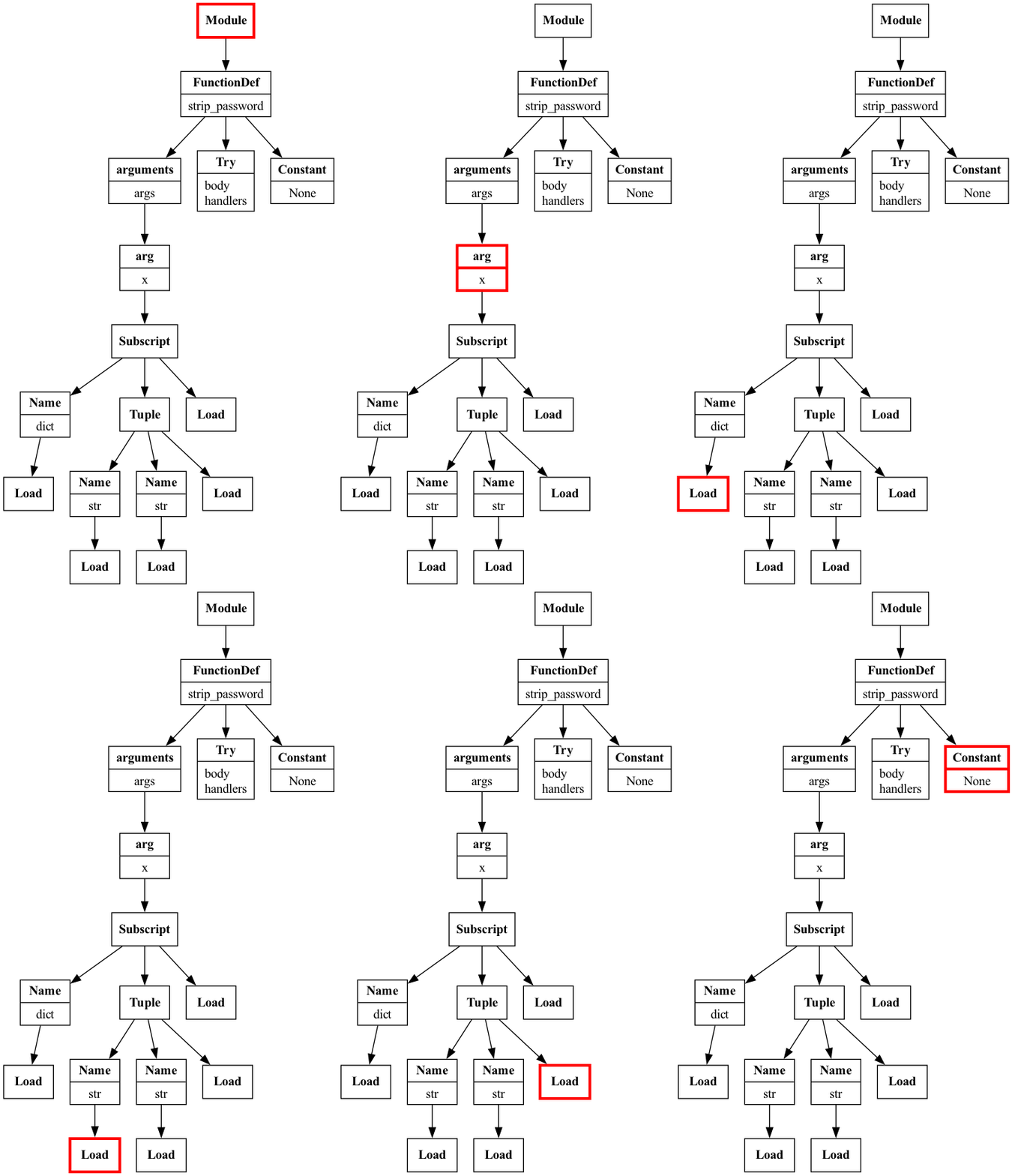
Partial AST traversal of the
try_except_nested.py snippet with the initial TryExceptVisitor visualized with Graphviz.
The generic_visit() method
When we don't define a dedicated visit_<NodeType>() method for an AST node, the ast.NodeVisitor calls the generic_visit() method, which continues the traversal. The visit_Try() method we defined does not currently call generic_visit() on that node, so the traversal does not go any deeper.
We need to call generic_visit() ourselves. Note the indentation level – it is outside of the if because we want to visit all nodes, regardless of whether their ancestors had the issue we are looking for:
examples/try_except_visitor_2.py
The TryExceptVisitor now visits the innermost try and detects the issue:
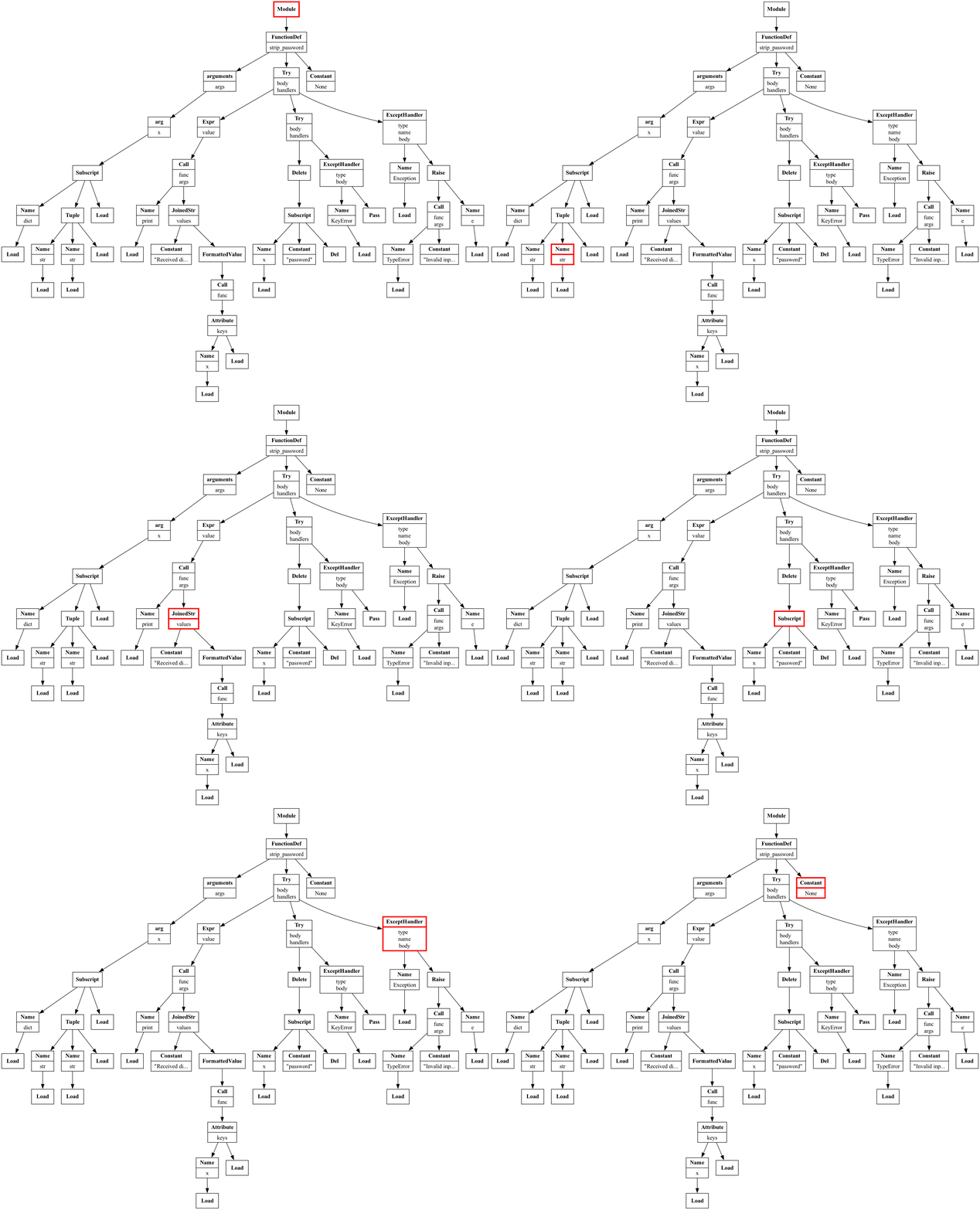
Full AST traversal of the
try_except_nested.py snippet visualized with Graphviz.
Exercise 3
Create a GenericExceptionVisitor class that detects both bare except blocks and the usage of generic Exceptions:
try:
    del x['non_existent_key']
except:  # bare except
    raise Exception('No such key')  # generic Exception
Tip: Start by exploring ast.ExceptHandler and ast.Raise nodes in the generic_exception.py snippet, which has multiple variations of what we want to detect:
$ ast-explore snippets/generic_exception.py --interactive \
    --types ExceptHandler Raise
Bonus: If you have time, use the ast.get_source_segment() function to print any problematic code you detect.
Example solution
In addition to ast, we will also use textwrap for text formatting:
We start by inheriting from ast.NodeVisitor:
In order to use ast.get_source_segment(), we need the source code string:
_print_source_segment() will print the source code we reference:
ast.get_source_segment() needs the full source code and the AST node:
visit_Raise() defines our actions when we encounter ast.Raise nodes:
Here, we look for raise Exception:
or raise Exception(...):
If either is true, we print the issue, line number, and the code itself for reference:
Regardless of whether we found something, we make sure to continue the traversal:
We also need to visit ast.ExceptHandler nodes:
With a bare except, there is no exception type provided in node.type:
With a generic exception, the exception type provided is Exception:
Again, regardless of whether we found something, we continue the traversal:
We generated the AST in __init__(), so we create run() to call visit():
examples/generic_exception_visitor.py
Using the GenericExceptionVisitor is a little different. This time, we pass in the source code when we initialize it, and we call the run() method to kick off the traversal:
ast.NodeTransformer
The ast.NodeTransformer performs the traversal in the same way that the ast.NodeVisitor does, but it can modify the AST. So far, our visit_*() methods haven't returned anything (implicitly, they all returned None). However, with the ast.NodeTransformer, the return value modifies the AST:
- Returning
Nonedeletes the subtree rooted at that node (i.e., that node and all of its descendants) - Returning
transformed_nodereplaces the subtree rooted at the visited node withtransformed_node(or keeps it if it wasn't modified)
Circling back to our try/except/pass detector, we can create an ast.NodeTransformer to rewrite that code to use contextlib.suppress() instead of just suggesting it:
def strip_password(x: dict[str, str]) -> None:
    try:
        del x['password']
    except KeyError:
        pass
↓
import contextlib

def strip_password(x: dict[str, str]) -> None:
    with contextlib.suppress(KeyError):
        del x['password']
Rather than write the AST directly, we will write source code, parse it, then edit it. We will need to update Exception if there is a more specific exception, and the contents of the with block currently represented by the pass statement:
with contextlib.suppress(Exception):
    pass
We can use ast-explore to familiarize ourselves with the structure we need to manipulate:
$ ast-explore snippets/suppress_example.py --interactive \
    --types With withitem Call
Here's the abbreviated output:
The ast.With node we need is stored in the body of an ast.Module node:
We will replace the contents of the body with the contents of the try block:
The items attribute has all the context managers in the with block:
Here's the call to create the contextlib.suppress context manager:
The exception to suppress is the argument passed to contextlib.suppress():
Let's code it up now. Once again, we will use the ast module along with textwrap:
We start by inheriting from ast.NodeTransformer:
has_changed indicates whether we need to add an import for contextlib:
_get_suppress_block() will take an ast.Try node and convert it:
Rather than write the AST directly, we will write source code, parse it, then edit it:
The ast.With node we need is stored in the body of an ast.Module node:
We suppress() the exception from the except (when it's not a bare except):
The body of the with block will be the code that was in the body of the try:
Finally, we return this new node so that we can update the AST:
The ast.NodeTransformer will call our visit_Try() method during traversal:
First, we get the updates from all descendant nodes:
If we need to rewrite a try block, we will report it and start the AST update:
We call _get_suppress_block() to get the new node and track the change:
By returning the new node, the try block is replaced by the new with block:
Notice that we don't have to specify the indentation level – the AST handles this:
Finally, we create a run() method as the entry point:
We start by calling visit() to traverse the entire AST:
If any edits were made, we will add import contextlib to the top of the module:
We return the modified AST with all the location information required to compile:
examples/try_except_transformer.py
We can use the TryExceptTransformer on the try_except.py snippet to generate the modified AST. Remember that using ast.unparse() may result in other changes to the code, such as the loss of comments and formatting:
Note that, in order to simplify the code, we didn't check if there was already an import of contextlib or even the suppress() function, but you could do that as well.
Exercise 4
Create an ast.NodeTransformer to add placeholder messages to all assert calls that don't have them. We did this earlier with ast.walk(), and this will look very similar. Don't forget to return the node after visiting it, or it will be removed from the tree.
Reminder: We want to visit the ast.Assert nodes and check for the presence of a message (available in the msg attribute). You can review the structure of the node with ast-explore as follows:
$ ast-explore snippets/assert.py --types Assert
Example solution
examples/assert_transformer.py
Managing context during traversal
Up until this point, we were only concerned with a node and its immediate children, but sometimes we need to understand a node's ancestry (i.e., parents, grandparents, etc.), which, since nodes don't hold references to their parents, is not possible without some extra accounting on our end. One such case is taking into account what is in scope (variables, imports, etc.) when processing nodes.
In this section, we will learn how to track this information as we build an import linter capable of flagging unused imports, along with masked and missing names.
Finding all imports
Let's take a look at the imports.py snippet, which has one import of each case we need to handle. Notice we have module-level imports and imports inside functions:
The two node types we need to visit are ast.Import and ast.ImportFrom:
The initial version of the ImportVisitor finds all the imports in a module:
We start by importing ast and inheriting from ast.NodeVisitor:
We will track imports in the imports_available list:
We will be visiting both ast.Import and ast.ImportFrom nodes:
In both cases, we will track the import in the same way, so we add a helper method:
Each import statement can import multiple names, so we loop over them:
We will ignore any from x import * imports as a simplification:
For each named import, we track its name and alias (if any), along with its module:
We use getattr() here because this is only for ast.ImportFrom nodes:
We add the imports extracted from the node to imports_available:
As we have seen before, we call generic_visit() to continue the traversal:
Last, we have the initial version of our run() method, which just calls visit():
checkpoints/initial.py
Our ImportVisitor finds each of the imports:
Tracking import scope
In order to flag missing names and unused imports, we need to know which imports are available to us. However, right now, we don't have the full story – we need to account for their scope. For example, the import of json on line 2, is only available within the scope of the get_data() function, which is narrower than the module scope, in which we call json.dump() on line 8:
def get_data():
    import json
    return json.loads('{"key": "value"}')

data = get_data()

# this results in a NameError
json.dump(data, 'data.json')
Using a stack to track scope
Let's update our ImportVisitor to track import scope:
Our __init__() method now initializes a stack for tracking the ancestry:
Each time we visit an import node, we will now record the scope:
A node's scope is the path to it from the root of the tree:
We will override the generic_visit() method to keep the stack up-to-date:
Each time we visit a node that has a body attribute, our scope changes:
We call the superclass's generic_visit() method to continue the traversal:
Afterward, we remove the node from the stack (remember, this is depth first):
checkpoints/stack.py
Now the ImportVisitor includes the scope in which each of the imports can be used, and we are one step closer to detecting missing names and unused imports:
What's currently in scope?
As we explore the AST, we need to be able to determine which names (e.g., imports, variables, function definitions) are in scope. A name is in scope if its definition scope matches the current scope or is a prefix of it:
| definition scope | current scope | is in scope? |
|---|---|---|
module |
module |
True |
module |
module.function |
True |
module |
module.function.with |
True |
module.function |
module |
False |
module.function |
module.function.with |
True |
Exercise 5
Starting from checkpoints/exercise_5.py, write the following methods for the ImportVisitor class to add the functionality to determine which imports are in scope given the current state of the stack during traversal:
_is_in_scope(self, definition_scope: str) -> bool, which given an import's scope (definition_scope) will return whether it is currently in scope (using the stack)get_in_scope_import(self, name: str) -> dict | None, which will filter theimports_availablelist down to the import ofnamethat is currently in scope by calling_is_in_scope()and breaking ties by selecting the narrowest scope (e.g.,module.xis narrower thanmodule)
Note: We will be using _is_in_scope() later for checking whether other names are in scope, so don't pass in the full import dictionary inside imports_available.
Example solution
The definition_scope is in scope if the stack starts with that path. We slice the stack and compare the lists for equality instead of comparing strings to avoid any false-positives (e.g., module.a is a substring of module.abc, but they have different scopes):
def _is_in_scope(self, definition_scope: str) -> bool:
    check_scope = definition_scope.split('.')
    return self.stack[: len(check_scope)] == check_scope
The get_in_scope_import() method uses _is_in_scope() to filter imports:
First, we grab all imports of name that are in scope:
For aliased imports, we only compare name to that alias:
If nothing is in scope, we return None:
Otherwise, we take the narrowest scope (more dots, means deeper in the stack):
Tracking name definitions
As alluded to before, in order to see if an import is missing, we also need to track all the names used and the scopes in which they were defined. Imports, class definitions, function definitions, function arguments, and variable are all names. Think about what happens if you try to run ast.parse() without first running import ast – you get a NameError:
>>> ast.parse('x = 1')
Traceback (most recent call last):
  File "<stdin>", line 1, in <module>
    ast.parse('x=1')
    ^^^
NameError: name 'ast' is not defined. Did you forget to import 'ast'?
We will use a defaultdict to track names, where the key is the name we find in the source code we are processing, and the value is a list of dictionaries that each contain the scope upon declaration, the type of name it is (e.g., builtin, import, etc.), and the line number (if not a builtin like dict, sum, or KeyError):
checkpoints/exercise_6.py
Exercise 6
Starting from checkpoints/exercise_6.py, update the ImportVisitor to include name tracking for imports (ast.Import and ast.ImportFrom), class definitions (ast.ClassDef), function definitions (ast.FunctionDef and ast.AsyncFunctionDef), function arguments (ast.arg), and variables (visit assignments by visiting ast.Name when ctx is of type ast.Store). Note that we will be ignoring the ast.Del context on ast.Name nodes to keep things simple.
Bonus: If you have time, print out a warning whenever a name is redefined within a given scope, for example:
Example solution
Let's update our ImportVisitor to track names:
The _track_name_definition() method updates names_defined:
We are already processing imports, but we need to track the names now:
If the import was aliased, that will be the name, otherwise it is the import name:
Here, we track names from variable assignments (note the ast.Store context):
Rather than writing several similar visit_*() methods, we override visit():
This replaces the visit_Import() and visit_ImportFrom() methods:
Here, we handle class and function declarations, as well as function arguments:
The only difference is how we extract the name itself:
For all other nodes, we preserve the superclass's behavior:
checkpoints/exercise_7.py
Exercise 7
We are now ready to detect missing name definitions and unused imports. Missing name definitions can be detected during the AST traversal, but unused imports will have to be checked at the end (after we have counted the number of times each import is used). Starting from checkpoints/exercise_7.py, make the following changes to the ImportVisitor to add this functionality:
- Update
visit_Name()to handle theast.Loadcontext. Here, you should flag missing name definitions. - Track the number of times an import is accessed (not defined), and use this information to flag unused imports after the traversal has finished.
Example solution
Let's go over the changes to the ImportVisitor:
The first change is in the _visit_import() method:
We now track the import's line number and the number of times it was accessed:
In the visit_Name() method, we now handle the ast.Load context:
The ast.Load context means we accessed the name:
First, we check if the name is in scope (remember, this includes imports):
If not, we report that the name is missing:
Otherwise, we grab the narrowest scope of that import (None, if it's not an import):
If there is an in-scope import, we increment the number of times it was accessed:
We handle flagging unused imports in the run() method:
First, we perform the full traversal of the AST:
Then, we check which imports haven't been accessed and flag them:
checkpoints/final.py
Potential next steps
As far as this workshop is concerned, we are done with the ImportVisitor, but, if you would like more practice, it can still be extended further. You can use the version found in checkpoints/final.py as a starting point for further enhancements:
- Account for deleting names with
del(this is theast.Delcontext) - Handle
from x import * - Suggest imports when names are missing like Python does for certain
NameErrors - Remove the unused imports by converting it to an
ast.NodeTransformer - Flag and remove duplicate imports
Thank you!
I hope you enjoyed the session. You can follow my work on these platforms: